We Use Cookies
We use cookies to enhance your browsing experience, analyze site traffic, and personalize content. By clicking "Accept All", you consent to our use of cookies. You can customize your preferences or reject non-essential cookies.
Learn more about our cookie policyMistral OCR: World's Best Document Extraction Engine
Transform your documents into AI-ready knowledge with Mistral OCR—the state-of-the-art document extraction engine powering AI·Collab. Process up to 1000 pages at just 4 credits per page with unmatched accuracy.
Revolutionary Document Understanding
Approximately 90% of the world's organizational data is stored as documents—PDFs, scanned images, handwritten notes, and complex technical papers. To unlock this potential, AI·Collab has integrated Mistral OCR, the world's best document understanding API. Mistral OCR sets a new standard in document extraction, comprehending each element of documents—media, text, tables, equations—with unprecedented accuracy and cognition. Unlike traditional OCR solutions, Mistral OCR understands context, structure, and meaning, making it ideal for RAG systems and knowledge base creation.
Outstanding Capabilities
Lightning Fast
Process up to 2000 pages per minute on a single node. Being lighter weight than most models in the category, Mistral OCR performs significantly faster than its peers.
Massive Scale
Handle documents up to 1000 pages with ease. Perfect for enterprise document processing pipelines and high-volume digitization projects.
State-of-the-Art Accuracy
Achieves 94.89% overall accuracy, outperforming leading OCR solutions including Google Document AI, Azure OCR, Gemini, and GPT-4o.
Natively Multilingual
Parse, understand, and transcribe thousands of scripts, fonts, and languages across all continents. Achieves 99.02% fuzzy match accuracy in multilingual generation.
Transparent, Affordable Pricing
Mistral OCR is available at an industry-leading price point, making advanced document extraction accessible to everyone.
Credits never expire and can be used across all AI·Collab features. Perfect for both one-time projects and ongoing document processing needs.
Comprehensive Document Understanding
Mistral OCR excels at processing the vast majority of document types found in organizations and everyday settings. Here's what makes it exceptional:
Complex Document Elements
Understands interleaved imagery, mathematical expressions, tables, and advanced layouts such as LaTeX formatting. Perfect for scientific papers with charts, graphs, equations, and figures.
Advanced Table Reconstruction
Reconstructs table structures with headers, merged cells, multi-row blocks, and column hierarchies. Outputs HTML table tags with colspan/rowspan to fully preserve layout—achieving 96.12% accuracy on complex tables.
Handwriting Recognition
Accurately interprets cursive, mixed-content annotations, and handwritten text layered over printed forms. Ideal for digitizing historical documents, forms, and personal notes.
Mathematical Expressions
Processes complex mathematical formulas and equations with 94.29% accuracy. Perfect for scientific papers, technical documentation, and educational materials.
JBIG2 Compression Support
Unlike many OCR solutions, Mistral OCR fully supports JBIG2-compressed PDFs—a common format in scanned documents. This eliminates crashes and extraction failures that plague other systems.
Benchmark Performance
Mistral OCR consistently outperforms other leading OCR models in rigorous benchmark tests. Its superior accuracy across multiple aspects of document analysis is illustrated below:
Benchmarks based on internal test-set containing various publication papers and PDFs from the web. Mistral OCR extracts embedded images from documents along with text, a capability many competitors lack.
Multilingual Performance Excellence
Mistral OCR 3 demonstrates exceptional accuracy across diverse language groups, consistently outperforming competitors like Azure, Google Document AI, DeepSeek OCR, and AWS Textract.
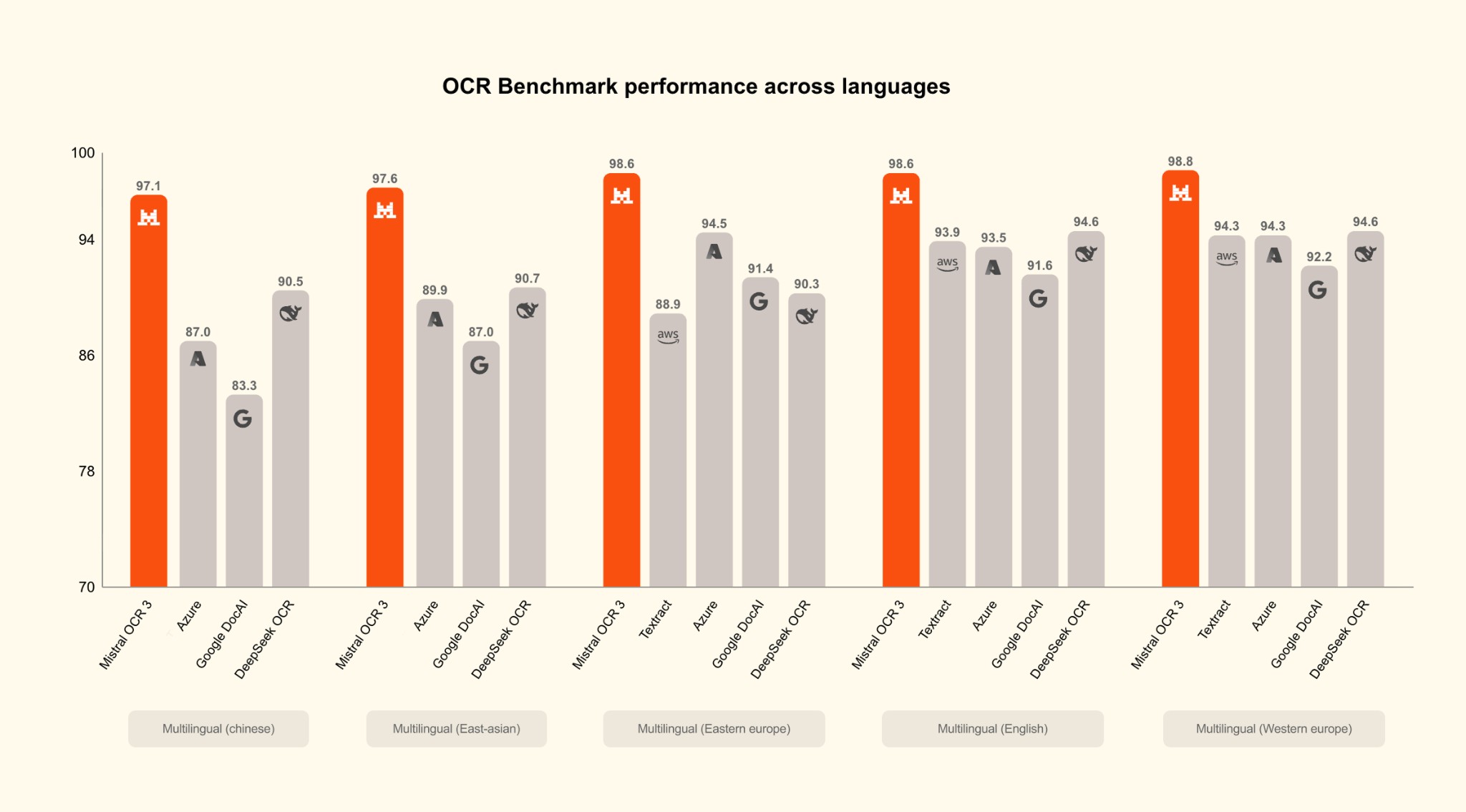
As shown in the chart above, Mistral OCR 3 achieves scores ranging from 97.1% (Chinese) to 98.8% (Western European languages), maintaining a significant lead of 4-7 percentage points over the nearest competitors across all language groups. This makes it ideal for global organizations handling documents in multiple languages.
Superior Performance Across Document Types
Mistral OCR 3 leads in every document category tested, from structured forms to challenging handwritten content, demonstrating its versatility and reliability.
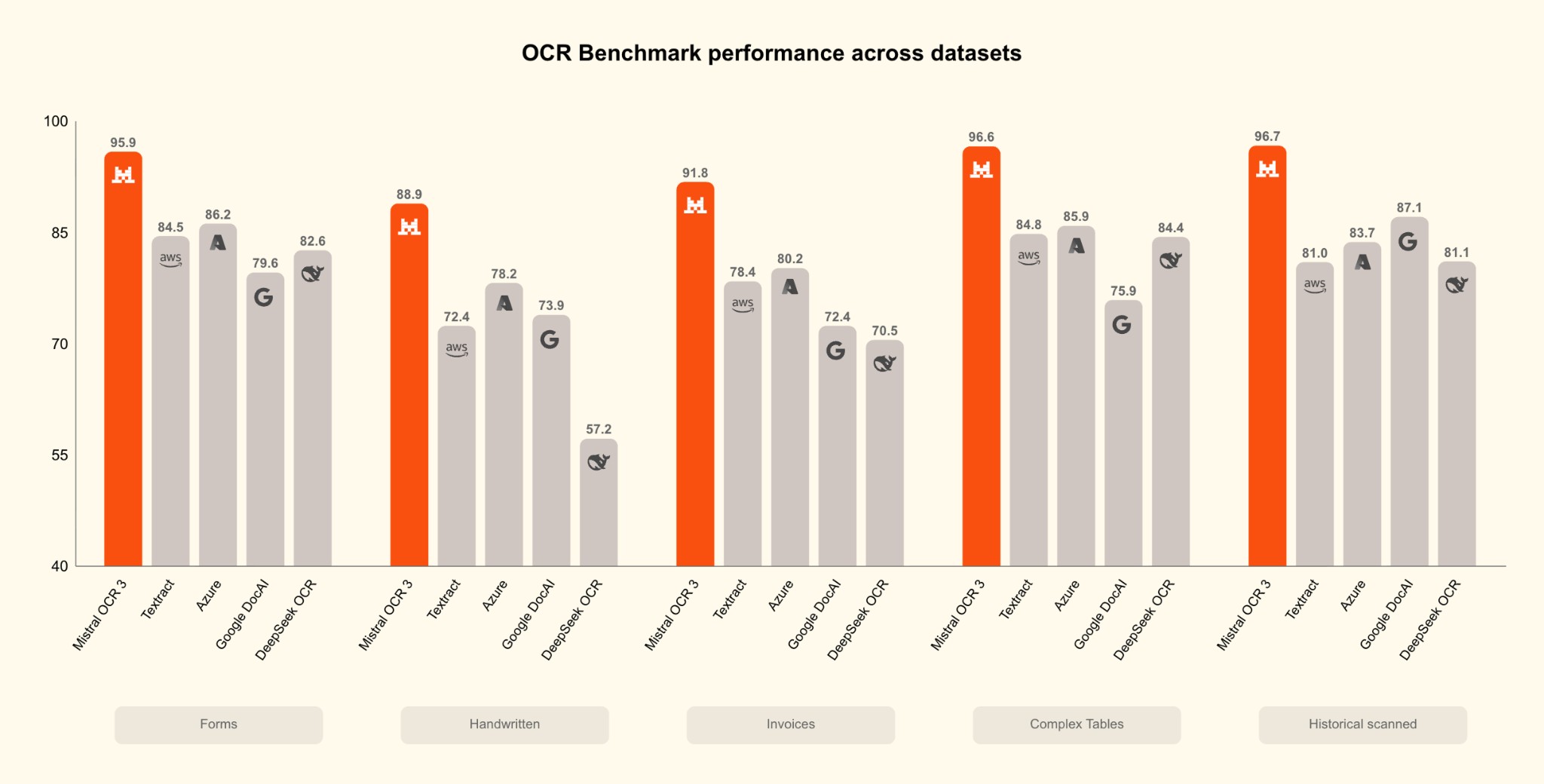
The benchmark results reveal Mistral OCR 3's dominance: 95.9% on Forms, 88.9% on Handwritten documents, 91.8% on Invoices, 96.6% on Complex Tables, and 96.7% on Historical Scanned documents. In each category, Mistral OCR 3 outperforms all competitors by substantial margins, making it the most reliable choice for diverse document processing needs.
Real-World Applications
Mistral OCR is transforming how organizations work with documents. Here are some key use cases where our technology is making a significant impact:
Digitizing Scientific Research
Leading research institutions use Mistral OCR to convert scientific papers and journals into AI-ready formats, making them accessible to downstream intelligence engines. This facilitates measurably faster collaboration and accelerated scientific workflows.
Preserving Historical and Cultural Heritage
Organizations and nonprofits that are custodians of heritage use Mistral OCR to digitize historical documents and artifacts, ensuring their preservation and making them accessible to a broader audience.
Streamlining Customer Service
Customer service departments explore Mistral OCR to transform documentation and manuals into indexed knowledge, reducing response times and improving customer satisfaction.
Making Literature AI-Ready
Mistral OCR helps companies convert technical literature, engineering drawings, lecture notes, presentations, regulatory filings, and legal documents into indexed, answer-ready formats, unlocking intelligence and productivity across millions of documents.
How It Works on AI·Collab
Using Mistral OCR on AI·Collab is seamless and automatic. Here's the process:
Upload Your Document
Simply upload your PDF or image file through the AI·Collab interface. Mistral OCR automatically detects and processes the document.
Automatic Processing
Mistral OCR processes your document, extracting text, images, tables, and structure. Processing typically completes in seconds, even for complex multi-page documents.
Knowledge Base Integration
The extracted content is automatically added to your knowledge base, making it searchable and accessible to AI models for RAG (Retrieval-Augmented Generation) workflows.
Transparent Billing
You're charged just 4 credits per page processed. All usage is tracked transparently in your account dashboard, so you always know exactly what you're paying for.
How to Use PDFs with Mistral OCR in AI·Collab
Once your PDF is processed with Mistral OCR, you can use it in AI·Collab's chat interface with two retrieval modes. Here's how to get the best experience:
Upload or Select Your PDF
Upload a PDF directly in the chat, or use the '#' symbol to access your knowledge base and select a PDF that has been processed with Mistral OCR.
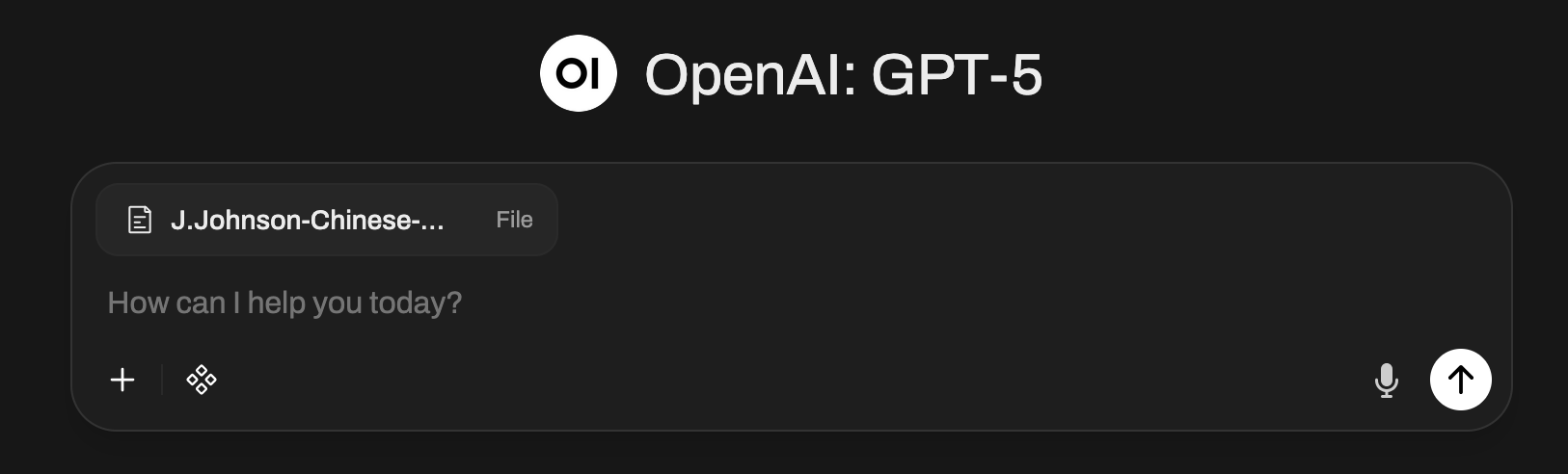
Click on the PDF Title
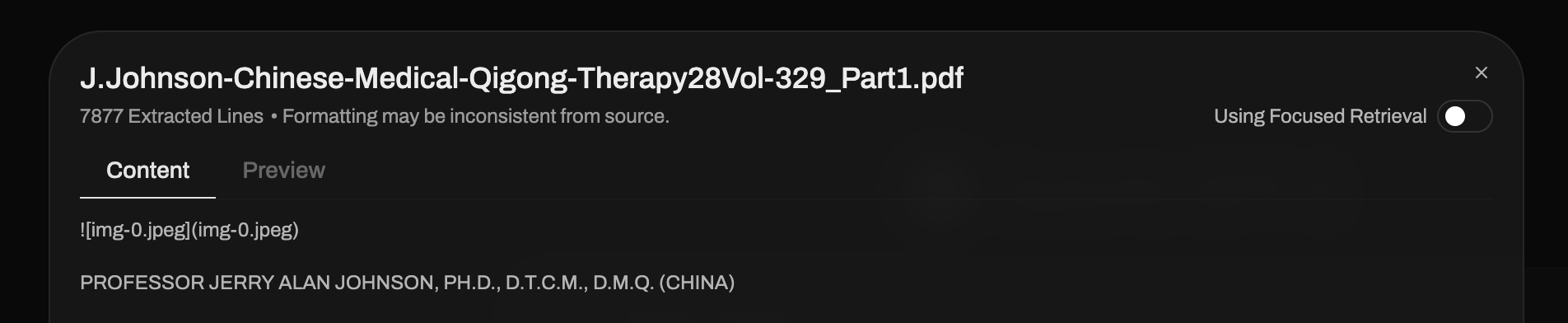
After uploading or selecting your PDF, click on the PDF filename to open the document details panel. This allows you to configure how the document is used in your conversation.
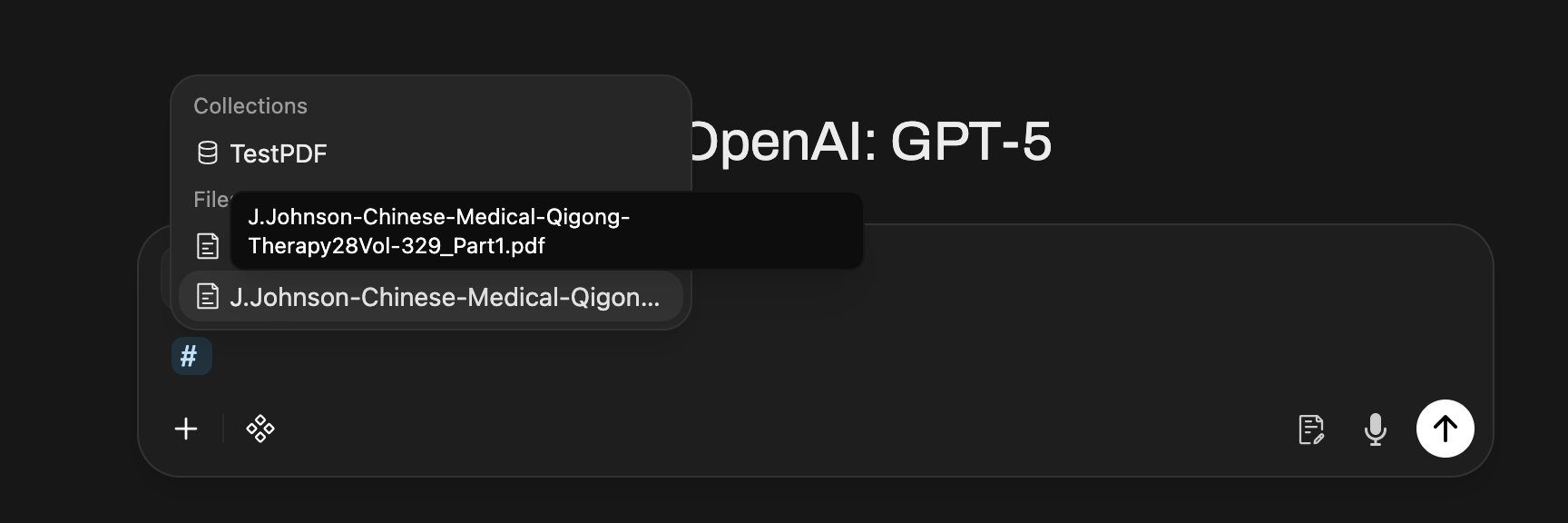
Choose Your Retrieval Mode
In the document details panel, you'll see a toggle for "Using Focused Retrieval". This is the default and recommended mode for most use cases.
Understanding Segmented Retrieval (Default)
With "Using Focused Retrieval" enabled (default), AI·Collab uses segmented retrieval—only the most relevant chunks of your document are retrieved and sent to the AI model. This is cost-effective and recommended for most cases, as it focuses on relevant content extraction.

Using Entire Document (Best Experience)
For the best experience with complete context, toggle "Using Focused Retrieval" OFF to enable "Using Entire Document" mode. This loads the complete document context into the AI model, providing the most comprehensive answers. Note: This mode is more expensive as it processes the entire document rather than just relevant chunks.

Cost Consideration
While "Using Entire Document" provides the best experience with complete context, it will consume significantly more tokens (and credits) compared to segmented retrieval. For example, a 1000-page document might use 288K+ tokens in full context mode versus 3-5K tokens with focused retrieval. Choose the mode that best fits your needs and budget.
Transform Your Documents Today
Mistral OCR represents the future of document understanding—combining state-of-the-art accuracy, lightning-fast processing, and affordable pricing in a single, powerful solution. Whether you're digitizing historical archives, processing scientific papers, or building a knowledge base from thousands of documents, Mistral OCR on AI·Collab provides the accuracy, speed, and scale you need.
Why Choose Mistral OCR on AI·Collab:
- Process up to 1000 pages per document with unmatched accuracy (94.89% overall)
- Affordable pricing: Just 4 credits per PDF page (€3.64 per 1,000 pages)
- Lightning-fast processing: Up to 2000 pages per minute
- Multilingual support: Handles thousands of scripts and languages
- Full JBIG2 support: No more crashes on scanned documents
Related Articles
RAG Pipeline: How Your Documents Become AI Knowledge
Learn how AI·Collab transforms PDFs into accurate AI answers — from OCR to embedding, hybrid search, and EU-hosted reranking. All data stays in Europe.
Read moreContext Window Explained (Tokens, Limits, and Pro Tips)
What “context” means on our model cards, why it matters, and how to work efficiently with long or short context windows.
Read moreNEW: Google Drive & OneDrive Integration — Access Your Files Directly in Chat
Attach documents from your cloud storage with one click. Connect Google Drive and Microsoft OneDrive to AI·Collab for seamless file access.
Read moreReady to Experience 300+ AI Models?
Get started today. Access models from OpenAI, Google, Anthropic, Grok and more.
GDPR compliant · Zero data retention · Cancel anytime