We Use Cookies
We use cookies to enhance your browsing experience, analyze site traffic, and personalize content. By clicking "Accept All", you consent to our use of cookies. You can customize your preferences or reject non-essential cookies.
Learn more about our cookie policyFree Models: Exploring ZDR and Non-ZDR Options
Discover free AI models available on AI·Collab. Learn about ZDR vs Non-ZDR models, understand the pros and cons, and find out how to access them.
What Are Free Models?
AI·Collab offers a selection of free AI models that you can use without any cost. These models are perfect for experimentation, learning, and light usage. However, it's important to understand the differences between ZDR (Zero Data Retention) and Non-ZDR free models, as well as their limitations. Free models are marked with a "FREE" tag and are available to all users, regardless of their subscription tier. They provide a great way to explore AI capabilities without committing to a paid plan.
ZDR vs Non-ZDR Free Models
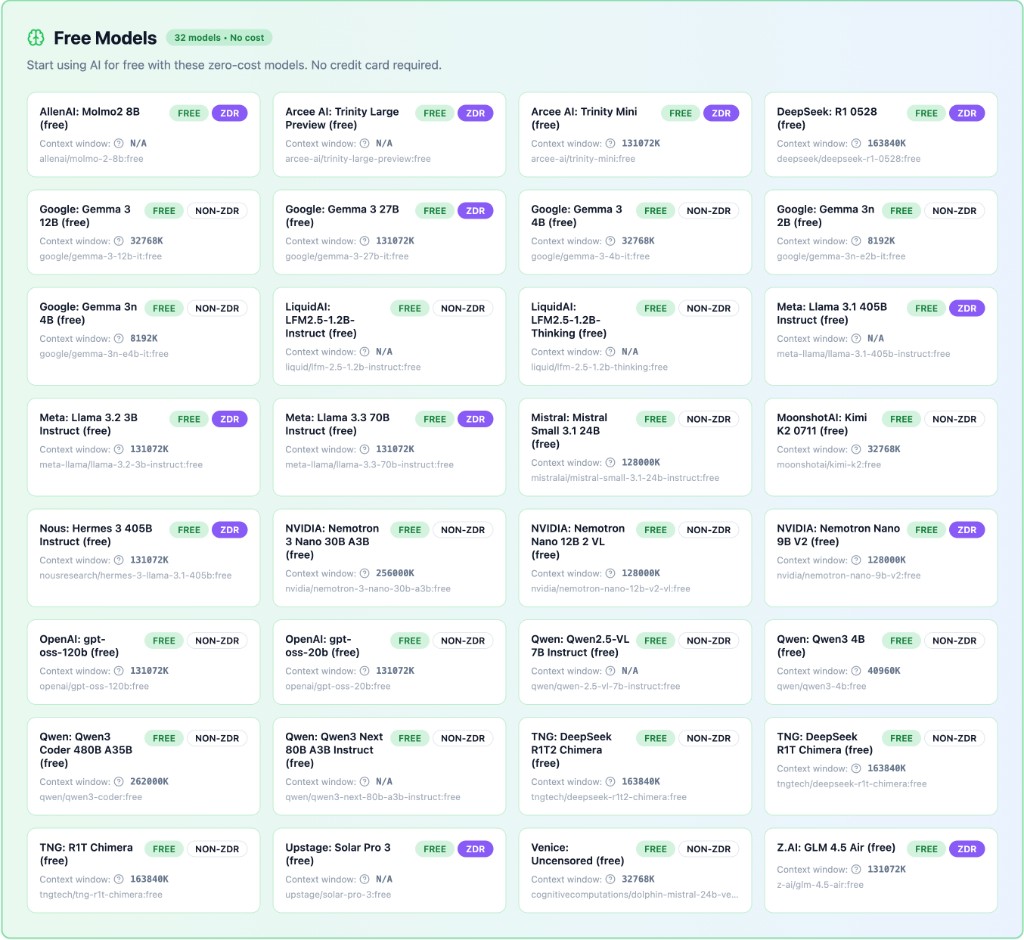
When browsing free models, you'll notice two important tags: ZDR and NON-ZDR. Understanding the difference is crucial for privacy-conscious users.
Learn more about Zero Data Retention Policy: Visit our ZDRP page
ZDR (Zero Data Retention)
These models guarantee that your conversations are never stored, logged, or used for training. Perfect for sensitive work, confidential information, or when privacy is paramount.
NON-ZDR
These models may have different data retention policies. While still free to use, they may store or log conversations according to the provider's terms.
Pros and Cons of Free Models
Advantages
- •No cost - perfect for testing and learning
- •Accessible to everyone, no subscription required
- •Great for experimentation and trying new use cases
- •Many ZDR options available for privacy-conscious users
Limitations
- •May experience rate limiting or temporary unavailability
- •Performance may not reflect paid model capabilities
- •Limited availability during high-demand periods
- •May have slower response times compared to premium models
Service Interruption Warning
Free models can experience service interruptions due to rate limiting or overload. When demand is high, free models may become temporarily unavailable or respond slowly. This is normal behavior for free-tier services. If you need reliable, consistent access for production work or time-sensitive tasks, we recommend upgrading to a paid plan with premium models that offer guaranteed availability and better performance.
Performance Expectations
It's important to understand that free models don't necessarily reflect the real performance of paid models. Free models may: • Have slower response times • Use older or smaller model versions • Have reduced context windows • Offer limited capabilities compared to their premium counterparts While free models are excellent for learning and experimentation, paid models provide better performance, reliability, and access to the latest model versions.
How to Find Free Models
There are two main ways to discover and add free models to your workspace:
Browse the Models Page
Visit our models page to see all available free models. You can filter by "FREE" tag and see both ZDR and Non-ZDR options. Each model card shows important information like context window size, provider, and data retention status.
Add Models via Account Settings
Go to your Account Settings and navigate to "My Custom Models". Here you can search for free models and add them to your workspace. Use the search bar and type "free" to filter all available free models.
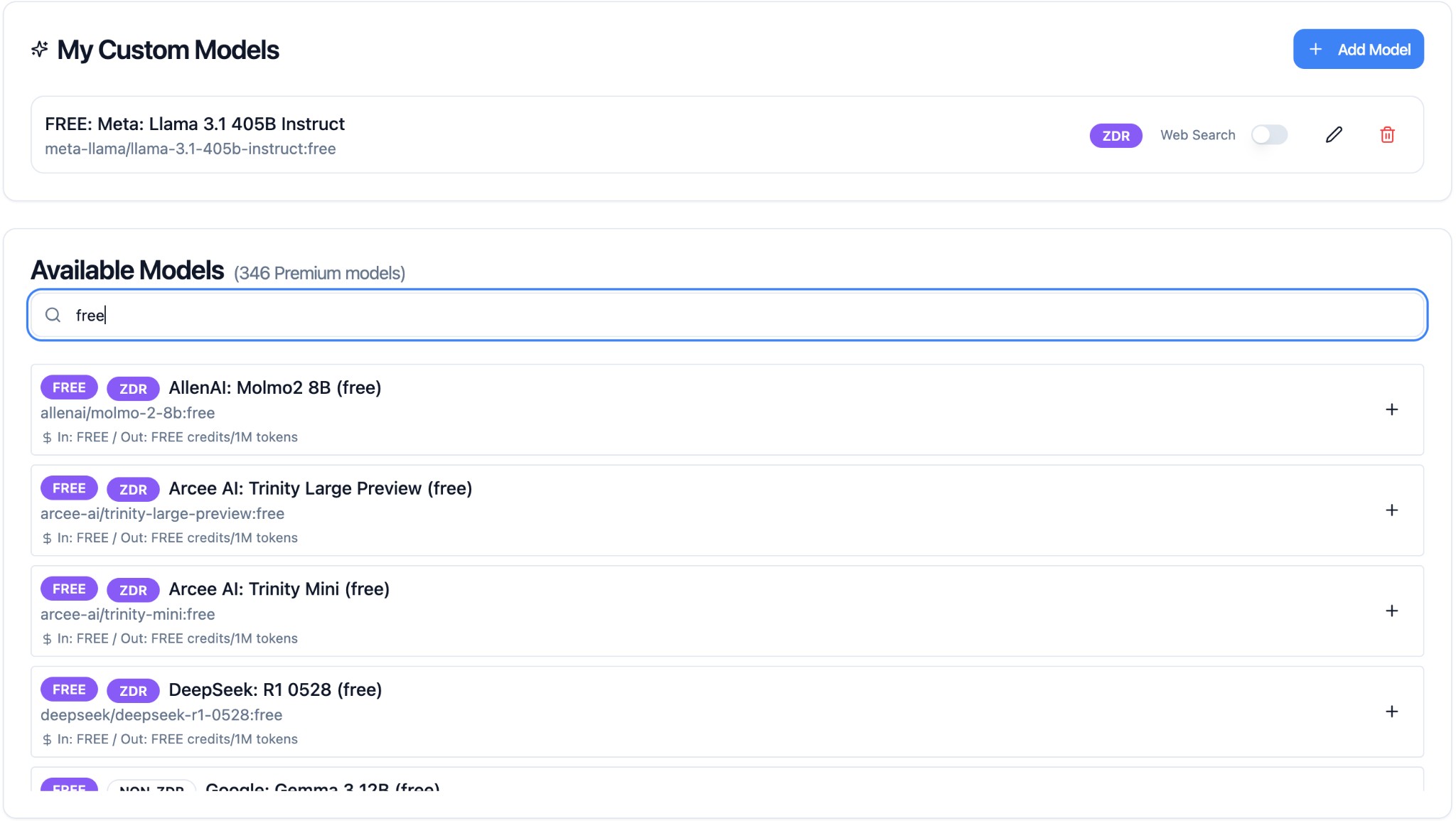
Note: The "My Custom Models" section may not be visible if you're a member of an organization and your organization admin or owner has disabled "User custom models".
Summary
Free models are a great way to explore AI·Collab's capabilities without any cost. They're perfect for learning, experimentation, and light usage. However, keep in mind that free models may experience interruptions and don't always reflect the performance of paid models. For production work or when you need reliable, consistent access, consider upgrading to a paid plan with premium models that offer better performance and guaranteed availability.
Quick Steps to Get Started:
- Visit the Models page or go to Account Settings → My Custom Models
- Search for "free" to see all available free models
- Review the ZDR vs Non-ZDR tags to choose based on your privacy needs
- Add models to your workspace and start experimenting!
Related Articles
Pricing Models
Choose your plan that fits your needs: PAYG, Monthly, or Yearly subscriptions with transparent pricing and flexible upgrades.
Read moreMultiple Models in Tabs: Compare, Learn & Merge Results
Use multiple AI models simultaneously in separate tabs. Compare different perspectives, verify information, and merge the best insights into one comprehensive answer.
Read moreHow to Choose the Right AI Model for Your Task
A practical guide to selecting and using AI models effectively with AI·Collab.
Read moreReady to Experience 300+ AI Models?
Get started today. Access models from OpenAI, Google, Anthropic, Grok and more.
GDPR compliant · Zero data retention · Cancel anytime