We Use Cookies
We use cookies to enhance your browsing experience, analyze site traffic, and personalize content. By clicking "Accept All", you consent to our use of cookies. You can customize your preferences or reject non-essential cookies.
Learn more about our cookie policyYou control which emails you receive from AI·Collab
A new Email Preferences section in your account lets you opt out of product announcements with one toggle — instantly, no unsubscribe link needed.
Full control over your inbox
You can now decide which emails you receive from AI·Collab directly in your account settings. The new Email Preferences card gives you a single toggle for product announcements and updates — newsletters, feature releases, and tips from the team. No waiting for an email to arrive so you can click unsubscribe. No forms. One click in your account, effective immediately.
One toggle. Full control. Instant.
The setting takes effect immediately. You can switch back on at any time from the same place.
How to manage your email preferences
It takes three steps and about five seconds.
Open your account
Go to aicollab.app/account. You will find the Email Preferences card between Account Information and Account Actions.
Find the toggle
The toggle labelled "Product announcements & updates" is on by default. Switch it off to opt out of all future broadcast emails.
Done — effective immediately
No confirmation email, no delay. You are removed from future broadcasts the moment you toggle off. Toggle back on at any time.
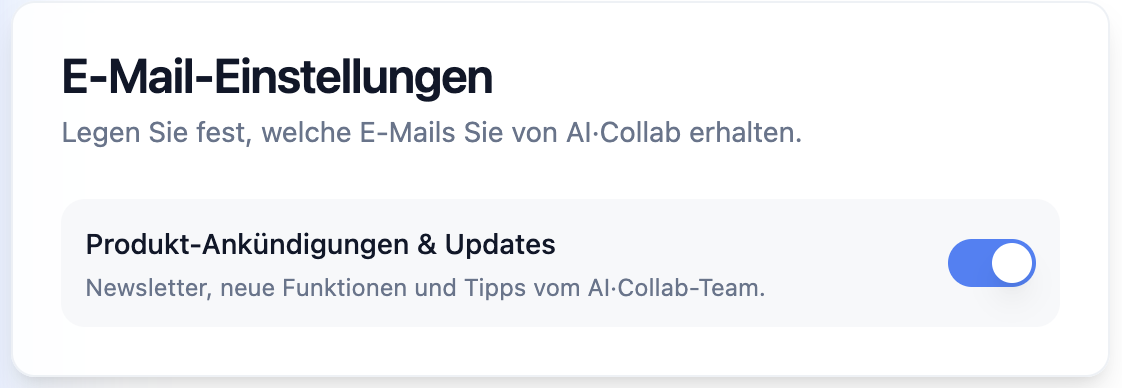
The Email Preferences card in your account — one toggle, effective immediately.
What is and is not affected
The opt-out applies only to broadcast emails — product news and updates sent to all users. Transactional emails that are technically necessary are not affected.
Opt-out covers
- Product announcements
- Feature release newsletters
- Tips and usage guides from the AI·Collab team
Always delivered (not affected)
- Payment confirmations and receipts
- Security notices
- Account and subscription status emails
Why we built this
- You should have full control over your communication — not just an unsubscribe link buried in an email footer
- The setting lives in your account, where it is easy to find and easy to change
- We only send broadcast emails when we have something genuinely useful to say — and you can opt out if you disagree
- GDPR and good practice: consent should be revocable at any time, directly by the user
Frequently Asked Questions
Does opting out affect transactional emails like receipts or security alerts?
No. The toggle only controls broadcast emails — product news, newsletters, and feature releases. Transactional emails (payment confirmations, security notices, subscription status) are technically necessary and will continue to be delivered.
How quickly does the opt-out take effect?
Immediately. As soon as you toggle off, you are excluded from all future broadcast sends. There is no delay or confirmation step.
Can I opt back in later?
Yes — at any time. Go to aicollab.app/account, find Email Preferences, and toggle back on. It takes effect instantly.
Where exactly is the setting?
In your AI·Collab account at aicollab.app/account. Scroll to the Email Preferences card — it sits between Account Information and Account Actions.
Will I still get emails about maintenance windows or service incidents?
Service incident and maintenance notifications are sent via the status page at status.aicollab.app. We recommend subscribing there for real-time updates regardless of your email preference setting.
Related Articles
Does Claude have temporary chat? Retention vs ChatGPT & Gemini
Claude Incognito exists — but vendor docs still describe retention windows. Compare ChatGPT, Claude and Gemini temporary modes for DPIAs and subprocessors.
Read morePrivacy-First AI: Automatic PII Protection & Content Filtering
How AI·Collab protects your privacy with automatic PII redaction and content filtering — GDPR-compliant AI that puts security first.
Read moreRefer a Friend: Earn 3,000 Credits Each
Share your link. When your friend makes their first purchase, you both get 3,000 bonus credits. Credits never expire.
Read moreReady to Experience 300+ AI Models?
Get started today. Access models from OpenAI, Google, Anthropic, Grok and more.
GDPR compliant · Zero data retention · Cancel anytime