We Use Cookies
We use cookies to enhance your browsing experience, analyze site traffic, and personalize content. By clicking "Accept All", you consent to our use of cookies. You can customize your preferences or reject non-essential cookies.
Learn more about our cookie policyAGENTIC AI: Models That Think, Remember & Research Autonomously
Discover how our frontier AI models can now manage your memories, search knowledge bases, and access chat history—without you asking.
What Does "AGENTIC" Mean?
AGENTIC models use native function calling (also called "Agentic Mode") to interact with built-in tools autonomously. Instead of you manually uploading files or searching your notes, the AI can decide on its own to:
- Save memories about your preferences and habits
- Search your knowledge bases for relevant documents
- Access your chat history to recall past conversations
- Manage your notes to organize information
- Search the web and fetch content from URLs autonomously
This creates a truly autonomous AI assistant that learns from every conversation and proactively retrieves information when needed.
How to Identify AGENTIC Models
Look for the
✨ In Your Account Settings
Visit https://aicollab.app/account → "My Custom Models" or "Available Models" dropdown
Models with memory tools show:
🏢 In Organization Settings
Organization admins see AGENTIC models tagged in the curation dropdown
Which Models Have AGENTIC Capabilities?
We've enabled native function calling for 67 frontier models with proven reasoning capabilities:
OpenAI GPT-5 Series
GPT-5.2, GPT-5 Mini, GPT-OSS-120B, O3-Mini
Both EU (Azure) and non-EU endpoints
Anthropic Claude
Claude 4.5 Opus/Sonnet, Claude 3.5 Sonnet
Industry-leading reasoning
Google Gemini 3
Gemini 3 Flash, Gemini 3 Pro
Fast multimodal processing
xAI Grok 4
Grok-4 Fast, Grok-4 Reasoning
Both EU and non-EU available
💡 Tip: Not all models work well with autonomous tools. We carefully selected models with strong reasoning capabilities for reliable AGENTIC behavior.
🧠 Memory Tools: Your AI Remembers You
AGENTIC models can autonomously save and recall facts about you across all conversations.
💬 Example Conversation:
You:
"I prefer dark mode for all my projects"
GPT-5.2 (AGENTIC):
"I'll remember that! [Internally calls: add_memory("User prefers dark mode for projects")]"
3 days later, in a new chat...
You:
"Help me design a React dashboard"
GPT-5.2 (AGENTIC):
[Internally calls: search_memories("UI preferences")]
"Based on your preference for dark mode, I'll create a dashboard with a dark theme..."
Available Memory Tools:
- Add to Memory - AI saves facts it learns about you
- Search Memories - AI recalls relevant past context
- Replace Memory Content - AI updates incorrect memories
⚙️ How to Enable Memories in OpenWebUI
Before AGENTIC models can use memory tools, you need to enable the Memory feature in your OpenWebUI Settings. Here's how:
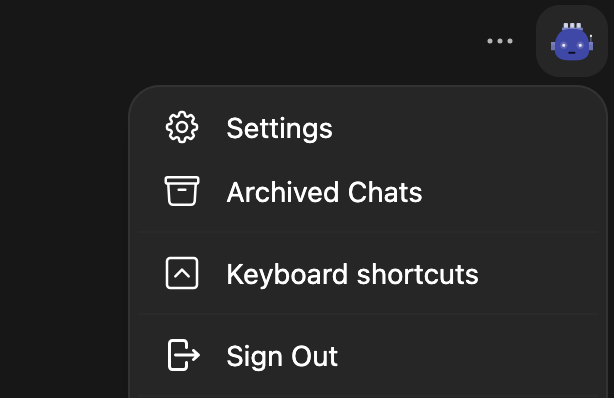
1.Open Settings
Click on your profile icon (or the "more options" menu) in the top right corner of OpenWebUI, then select "Settings".
2.Enable Memory Toggle
Navigate to "Personalization" in the settings sidebar, then find the "Memory (Experimental)" section. Toggle the switch to ON to enable memories.

💡 Once enabled, AGENTIC models will automatically use memory tools to save and recall information about you across conversations.
📚 Knowledge Base Tools: Autonomous Document Research
Upload your company docs, research papers, or technical manuals. AGENTIC models can autonomously explore and synthesize information from multiple documents.
💬 Use Case: Multi-Document Research
You:
"Compare our Q3 and Q4 revenue strategies"
Claude 4.5 Sonnet (AGENTIC):
[Calls: query_knowledge_bases("Q3 revenue strategy")]
[Calls: query_knowledge_files("Q4 revenue plans", kb_id="...")]
[Calls: view_knowledge_file(file_id="Q3_report.pdf")]
[Calls: view_knowledge_file(file_id="Q4_strategy.pdf")]
"After analyzing both quarterly reports, here are the key differences: Q3 focused on market expansion while Q4 shifted to retention..."
Available Knowledge Tools:
- List Knowledge Bases - See all accessible knowledge bases
- Query Knowledge Bases - Find relevant KBs by semantic meaning
- Search Knowledge Files - Find specific documents by filename
- Query Knowledge Files - Vector search across file content
- View Knowledge File - Read full document content
💬 Chat History Tools: Context Across Conversations
AGENTIC models can search and analyze your past conversations to provide continuity across chats.
💬 Use Case: Project Continuity
You (in a new chat):
"What was that React component we discussed last week?"
Gemini 3 Flash (AGENTIC):
[Calls: search_chats("React component", count=5)]
[Calls: view_chat(chat_id="...")]
"Found it! Last Thursday you built a UserProfileCard component with Tailwind CSS. Here's what we discussed..."
Available Chat Tools:
- Search Chats - Search across all your chat history
- View Chat - Read full conversation history
📝 Notes Tools: AI-Managed Documentation
Let AGENTIC models create, organize, and update your notes automatically as you work.
💬 Use Case: Meeting Summary
You:
"Summarize our product roadmap discussion and save it to notes"
GPT-5.2 (AGENTIC):
[Calls: search_chats("product roadmap")]
[Calls: view_chat(chat_id="...")]
[Calls: write_note(title="Product Roadmap Q1 2026", content="...")]
"I've created a note titled 'Product Roadmap Q1 2026' with key decisions and action items from our discussion."
Available Notes Tools:
- Search Notes - Find notes by title and content
- View Note - Read full note content
- Write Note - Create new notes
- Replace Note Content - Update existing notes
🌐 Web Research: Search & Fetch Autonomously
AGENTIC models can search the web and read full pages autonomously using two complementary tools:
Available Web Research Tools:
- Search Web - AI searches the web and finds relevant results
- Fetch URL - AI reads full webpage content for deep analysis
💬 Use Case: Deep Research
You:
"What are the latest developments in quantum computing?"
GPT-5 (AGENTIC):
[Calls: search_web("latest quantum computing developments 2026", 10)]
[Reviews snippets, finds interesting Nature article]
[Calls: fetch_url("https://nature.com/quantum-breakthrough-2026")]
"Based on recent research, here are the three major breakthroughs: 1. IBM announced a 1000-qubit processor... [comprehensive analysis with sources]"
⏰ Additional Tools: Channels & Time
Channel Tools:
- Search public channels and messages
- View channel threads and conversations
Time Tools:
- Get current timestamp (UTC/local timezone-aware)
- Calculate relative timestamps ("3 days ago", "next week")
🔒 Security & Privacy Guarantees
AGENTIC capabilities are designed with zero-trust security:
- User-Scoped Only
Memories, notes, and chat history are isolated per user. AI cannot access other users' data.
- No Tier Bypass
Tools operate within your tier restrictions. Knowledge base access respects sharing permissions.
- GDPR Compliant
All memories, notes, and history are deleted when you delete your account.
- EU Data Residency
EU models (Azure endpoints) keep your data in European data centers.
Getting Started with AGENTIC Models
Look for the AGENTIC Badge
Visit https://aicollab.app/account and look for models with the purple
Start Chatting
The AI will automatically use memory, knowledge base, notes, and chat history tools as needed. No manual configuration required!
💡 Pro Tips for AGENTIC Models
Be Specific About Context
Say "Check my notes from last week" or "Search my knowledge base about GDPR" to trigger the right tools.
Let the AI Save Preferences
When you mention preferences ("I prefer TypeScript over JavaScript"), quality AGENTIC models will automatically save it to memory.
Upload Reference Documents
Create knowledge bases with your company policies, research papers, or technical docs. AGENTIC models will search them autonomously.
Use Across Multiple Chats
Memories and notes persist across all conversations. Start a new chat and the AI remembers your context.
⚠️ Current Limitations
- •Image Generation Not Available
While OpenWebUI supports image generation tools in AGENTIC mode, we handle image generation through our Gemini Flash integration (not via native calling). Use vision-capable models for image analysis.
- •Two Web Search Systems
AGENTIC models use native tools (search_web, fetch_url) when web search toggle is OFF. When toggle is ON, the Exa plugin is used for models without function calling. Both systems work seamlessly.
- •Model Quality Matters
Only frontier models (GPT-5+, Claude 4.5+, Gemini 3+) reliably use these tools. Smaller models may struggle with complex multi-step reasoning.
Related Articles
Google Gemma 4 is here — with AGENTIC mode on AI·Collab
Gemma 4 26B A4B and 31B instruction-tuned models: native function calling, memory & tools, huge reasoning gains vs Gemma 3, and long context. Try them in your workspace today.
Read moreSkills: Reusable AI Instructions for Better Responses
Learn how Skills work — markdown-based instruction sets you attach to models or invoke in chat. Code review guidelines, writing rules, troubleshooting playbooks.
Read moreTwo Ways to Search the Web with AI: Native vs Plugin
Understand the difference between Native Agentic Search (Brave) and Exa Plugin Search. Learn which to use for best results.
Read moreReady to Experience 300+ AI Models?
Get started today. Access models from OpenAI, Google, Anthropic, Grok and more.
GDPR compliant · Zero data retention · Cancel anytime